Windows System Diagnostics Tool
A downloadable tool for Windows
# SysCheckTool (System Diagnostic Dashboard)
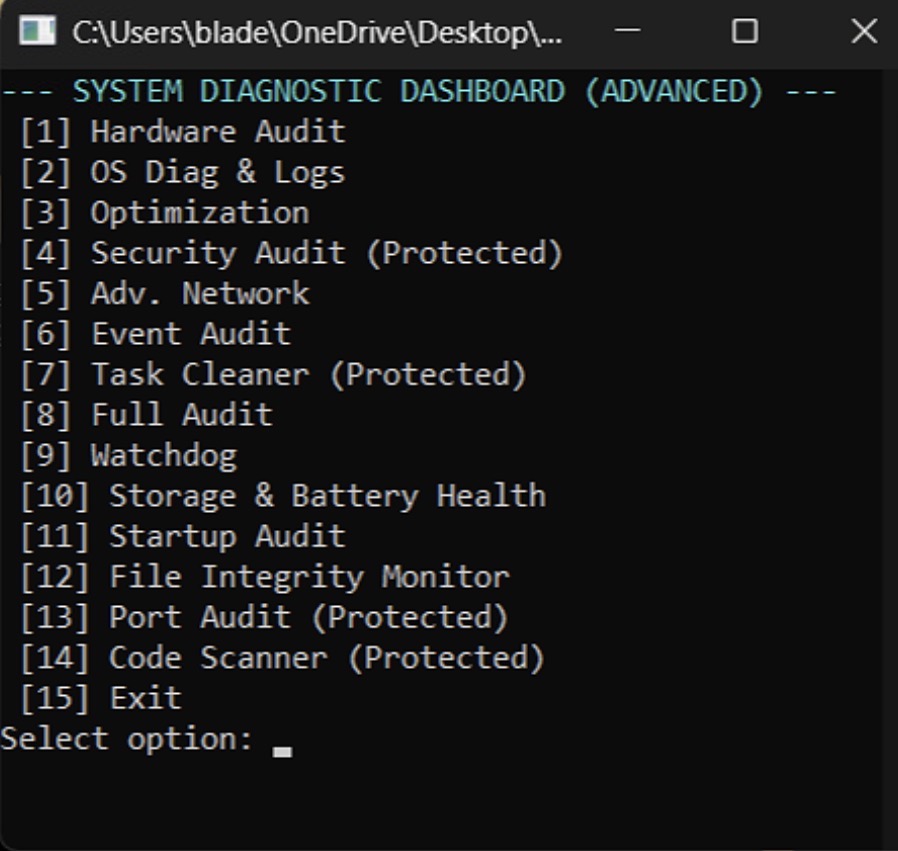
SysCheckTool is a comprehensive, custom-built command-line interface (CLI) diagnostic dashboard designed for Windows environments. It centralizes hardware monitoring, network diagnostics, and security auditing into a single, lightweight local application.
## Core Features & Modules
### Hardware & Thermal Performance
* Live Resource Tracking: Hooks directly into the system to pull real-time metrics, including individual CPU core loads, total RAM utilization, and active process threads.
* Thermal Monitoring: Reads native hardware thermal sensors to ensure the system is operating within safe temperature ranges.
* Storage & Battery Health: Runs status checks on local drives to report capacity and queries battery health configurations.
### Network Diagnostics & Connection
* Active Connection Polling: Maps out your current network state, displaying active IPv4 addresses, MAC addresses, connected wireless SSIDs, and current link speeds.
* Latency Testing: Automatically executes ping tests to measure network latency and verify external connectivity stability.
### Security & Threat Auditing
* Port Auditing: Runs local TCP connect tests against common vulnerability points (Ports 80, 443, and 3389) to verify no unauthorized local web services or remote desktop paths are silently open.
* Startup Program Audit: Scrapes the Windows registry and startup folders to list every application authorized to run on boot, allowing you to hunt for persistent, unauthorized background agents.
* Event Logging: Parses Windows Event Viewer logs to filter for critical system events, such as unexpected kernel-power failures.
### Continuous Monitoring (Watchdog)
* Automated Sentry Logging: The built-in "Watchdog" module acts as a background monitor, continuously polling system statistics at set intervals.
* Data Export: Actively writes live telemetry logs to localized text files for later review or parsing by external scripts and autonomous agents.
### System Optimization
* Maintenance Execution: Provides quick-access commands to clean up the OS environment, including flushing the DNS cache, running System File Checker (SFC) deep repairs, clearing temp files, and resetting network adapters directly from the console.
Download
Install instructions
1.Download & Place the Script:Secure the file location.
- Download the
SysDiagnostic.ps1file. - Move the file to a permanent, secure directory on your local drive (e.g.,
C:\Tools\orC:\AdminScripts\). Do not leave it in the Downloads folder, as the script writes persistent logs to a Desktop folder.
2.Create a Launch Shortcut:Bypass standard restrictions.
By default, Windows blocks double-clicking PowerShell scripts. To run this like a standard application:
- Right-click an empty space on your Desktop and select New > Shortcut.
- In the location field, paste the following command (update the path if you saved it elsewhere):
powershell.exe -ExecutionPolicy Bypass -WindowStyle Maximized -File "C:\Tools\SysDiagnostic.ps1" - Click Next, name the shortcut "System Diagnostic Dashboard", and click Finish.
3.Configure Permanent Admin Rights:Avoid UAC command prompt flashes.
The script has a built-in admin check, but setting elevation on the shortcut provides a cleaner launch experience.
- Right-click your new shortcut and select Properties.
- On the Shortcut tab, click the Advanced... button.
- Check the box for Run as administrator.
- Click OK, then Apply.
- Double-click the shortcut to launch the dashboard and enter your initialization password (
123).
Leave a comment
Log in with itch.io to leave a comment.