AI_Reader
A downloadable tool for Windows
AI Reader
Overview
AI Reader is a highly efficient, lightweight, and completely self-contained productivity tool designed to turn any copied text into instant audio. Packaged as an independent Windows executable, it runs flawlessly as a floating desktop widget without any distracting terminal windows or background clutter.
Core Features
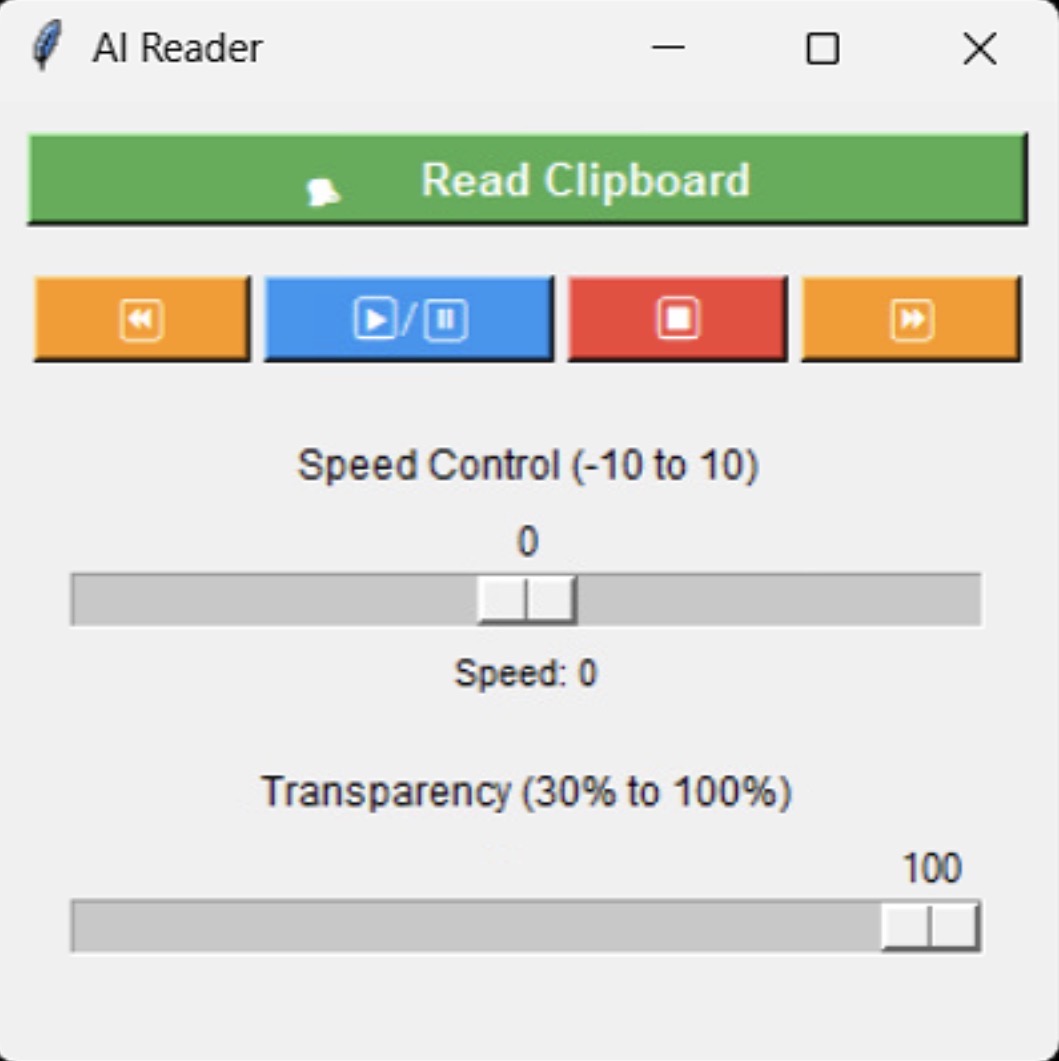
* Instant Clipboard Reading: Click the "🗣️ Read Clipboard" button to instantly grab whatever text is currently copied to the Windows clipboard and begin reading it aloud.
* Zero-Lag Multitasking: Utilizes asynchronous speech rendering, allowing the computer to remain fully responsive so you can continue scrolling or working while the audio plays.
* Smart Audio Purge: Copying new text and clicking the read button will automatically interrupt and purge the old audio queue to immediately start the new snippet.
Media Playback Controls
* ▶️/⏸️ Play & Pause: Freeze the speech at the exact word and resume exactly where you left off.
* ⏹️ Stop: Instantly silence the voice and completely clear out the current reading queue.
* ⏪ / ⏩ Rewind & Fast Forward: Skip backward or forward through the text exactly one sentence at a time.
Dynamic Customization
* Speed Control (-10 to 10): A custom slider linked directly to the Windows Speech API to speed up text for rapid proofreading or slow it down to help parse dense information.
* Transparency Slider (30% to 100%): Fade the application window into the background so it never completely blocks your view of web pages or documents.
* Always-On-Top Mini-Widget: The application automatically calculates your monitor's dimensions and neatly docks itself in the bottom-right corner of the screen. It permanently floats above all other windows, ensuring your controls are never buried.
Technical Specifications
* Native System Integration: Taps directly into Windows' built-in automation framework (win32com.client) via the standard SAPI (Speech API), requiring no internet connection or cloud APIs.
* Smart Voice Selection: Automatically scans the local operating system upon startup and defaults to a high-quality female narrator voice (e.g., Microsoft Zira).
* Invisible Execution: Built with advanced standard output redirection to run seamlessly as a windowless executable (.exe) without background terminal crashes or console pop-ups.
Download
Install instructions
1.Download the Setup File:Requires a web browser.
- Open your web browser and navigate to the official download page: itch.io/app
- Click the prominent Download button for Windows.
- This will download a file named
itch-setup.exe(usually located in yourDownloadsfolder).
2.Run the Installer:Downloads the latest release components.
- Locate
itch-setup.exeand double-click it to run. - Note: Unlike standard installers, this is a web installer. You will not see a traditional "Next > Next > Finish" wizard.
- A small command-line style window or progress bar will appear. It is actively downloading the most recent version of the itch client directly from their servers.
- Allow this process to complete without closing the window.
3.Launch and Authenticate:
- Once the background download finishes, the itch application will launch automatically.
- A shortcut will also be placed on your Desktop and in your Start Menu.
- On the launch screen, enter your itch.io username (or email) and password.
- If you don't have an account, click the Register link to create one in your browser, then return to the app to log in.
4.Configure Installation Directories:Optional but recommended.
By default, games downloaded through the app save to your primary drive. If you want to change this:
- Click your profile icon in the top right corner of the itch app.
- Select Preferences.
- Navigate to the Install locations tab.
- Click Add location to route your downloaded games and tools to a secondary drive or specific directory.
Leave a comment
Log in with itch.io to leave a comment.